

Fractus is a granular processor for creative sound design and music making. It excels at evolving textures, pads, rhythmic glitches, and experimentation. It records whatever passes through it and breaks it into as many as 256 grains at once. Those grains are shaped, pitched, reversed and scattered across the stereo field, then sent into a built-in diffuser and reverb. Freeze a moment and play with it, sync the grains to your session’s tempo, or play it from a keyboard.
- Intelligent Buffer scaling with Freeze
- Frozen buffer recall with project save or presets
- Character macro: audio degradation multi effect
- Reverb types: Plate, FDN and early-reflection
- 8-slot mod matrix, 4 LFOs, 2 random sources and an envelope follower
- MIDI: Learn, pitch tracking, polyphony and keyswitch modes
- VST3 · AAX · AU for Windows and macOS (Apple Silicon)
- 14-day free trial, no account needed
Current version is 0.9.1 Public Beta. Please download the free trial and send any feedback to info@thewavlab.com
Mac Installer (trial and full version)
Windows Installer (trial and full version)
Fractus, in general…
Fractus is a granular processor with traditional granular synthesis recombined into a unique plugin iteration. It keeps a rolling recording of your audio, up to 30 seconds, and plays it back as a cloud of short grains. You choose where the grains read from, how long they are, how often they fire, their pitch and direction, and where each one lands in the stereo field. The result can be a subtle shimmer, a frozen pad or a rhythmic stutter locked to your session’s tempo. It all runs as an ordinary insert effect on any mono or stereo track.
CPU Power
Hardware granular modules can be limited by their processor. Fractus can calculate and rebalance in unique ways. It can play up to 256 overlapping grains. We set that limit by balancing CPU performance at 192 kHz against how many grains are perceived in dense clouds. Basically… it goes all the way from sparse, separate events to dense, continuous clouds… without risking stability or latency at 192 kHz sample rates. Fractus calculates the cloud RMS to stay steady, so Density changes the texture, not the volume. It also intelligently helps you balance Grain Size, Density, and Max Grains.
Save Freeze Buffers
Press Freeze and the buffer holds still, so you can play with that moment for as long as you like. Unique to Fractus… The frozen audio is saved with your DAW session, NOT just as a preset. Users can choose to save presets as just dial settings or settings plus buffer audio. You can also load your own WAV, AIFF, FLAC or MP3 file straight into the buffer.
MIDI Learn +
By default Fractus is a plain effect that needs no MIDI, but it can use incoming MIDI data. Right-click any control to MIDI Learn it to a knob on your controller. Play notes to repitch grains, create an ADSR synth voice, play polyphonic 16-note chords, or keyswitch select tempo divisions for Grain ReMixing rhythmic content.
Tech Summary
- Grain Size from 1 ms to 4 seconds, in milliseconds or synced to note values
- Three trigger modes: a steady internal clock; host sync, which locks grains to the beat so every pass of a loop lands the same way; and a random mode that clumps and thins like a real cloud
- Position and Jitter choose where in the buffer grains read from, and how widely they spread around that point
- Pitch shifts the grains without changing their length
- Reverse sets the chance that each grain plays backward. At 100% every grain plays like backward tape
- Grain Shape morphs smoothly between square, triangle and smooth (Hann) envelopes
- Pan and Scatter place each grain individually in the stereo field, so a mono source becomes a wide stereo cloud
- Grain Mix blends in the dry signal, and the default patch sits within 1 dB of its input, so bypassing it doesn’t jump in level
- A buffer of up to 30 seconds, set in seconds or synced to bars
- Freeze holds the buffer still as a fixed source for the grains
- The frozen audio is saved with your session, and any preset can include it
- Load Buffer reads WAV, AIFF, FLAC and MP3 at any bit depth or sample rate
- Save Buffer writes what you froze to a file
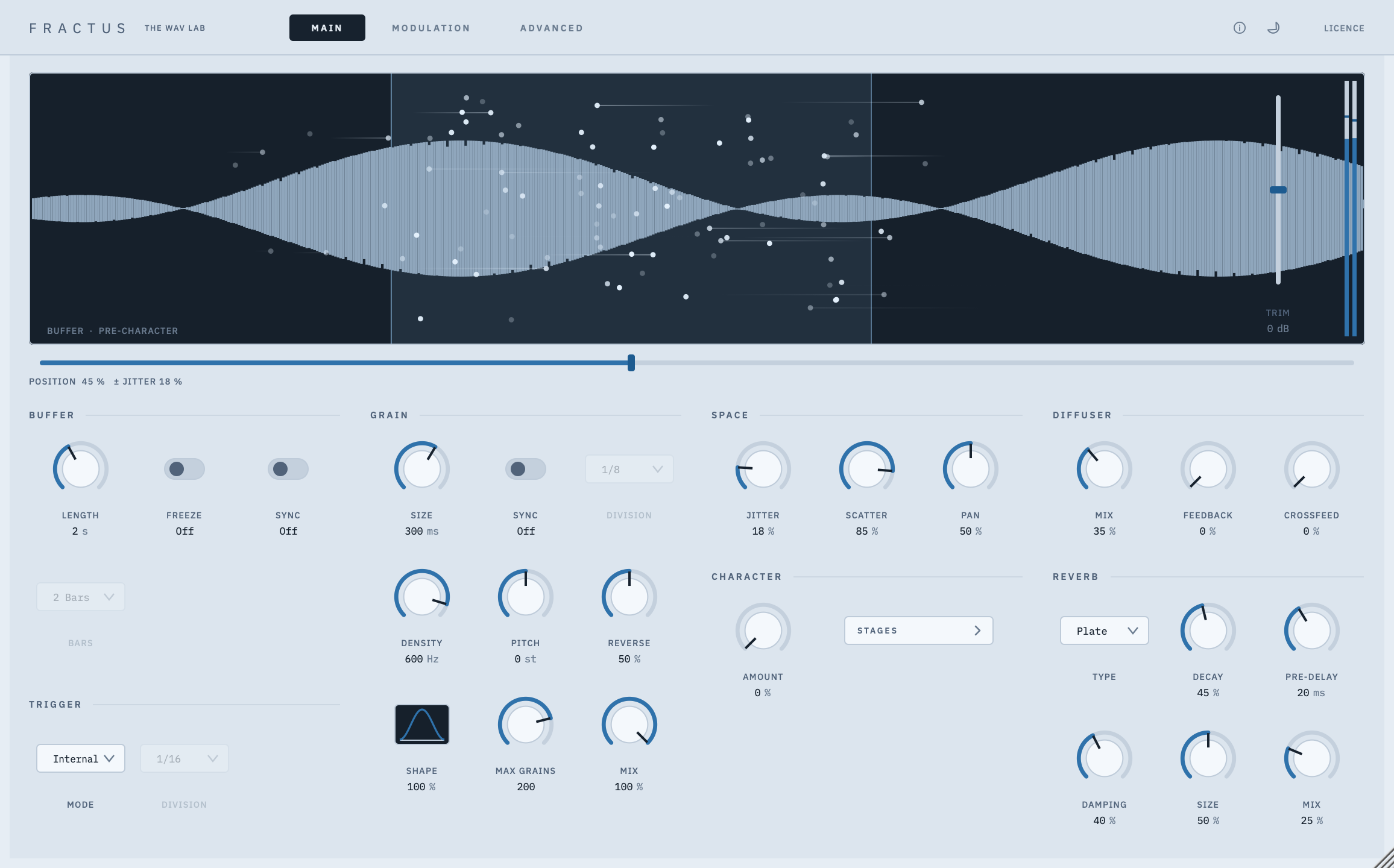
- The display shows the buffer’s waveform with every live grain drawn on top
One knob takes the sound from clean to degraded. As you turn Character up, saturation, band-limiting, sample-rate reduction, bit-crushing and reverb darkening all increase together. Each stage has its own depth control on the Advanced page, so you set how far each one goes.
- At zero, Character is completely transparent
- Level-compensated, so turning it up doesn’t make things louder
- Each stage’s control follows how that effect sounds, so there’s no dead travel
- It only colours the playback. The recorded buffer stays clean
- A diffuser (a chain of all-pass filters) smooths grain edges, with feedback and left-right crossfeed controls
- Three reverbs, written from scratch: plate, FDN and early reflections
- Decay, pre-delay, damping, size and mix, and every one of them can be modulated
- Decay only changes the length of the tail. It doesn’t make the reverb louder
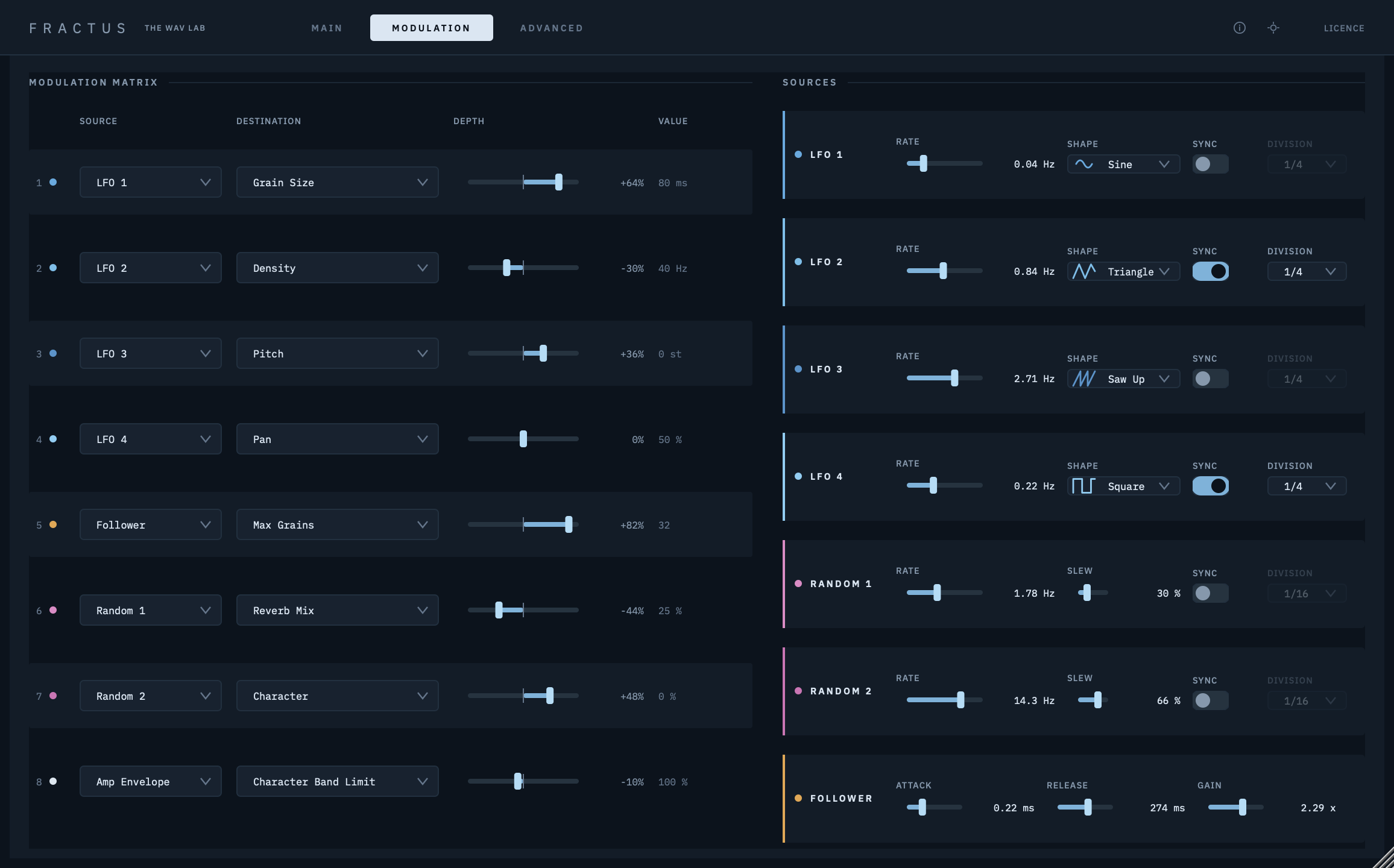
- An 8-slot modulation matrix with 26 destinations
- Four LFOs, free-running or synced to your tempo
- Two random sources with a slew control, from stepped to smooth. When synced, they repeat the same values on every pass of a loop
- An envelope follower that tracks your input level
- The MIDI amp envelope
- Modulation moves the sound without moving your knobs, so it never fights your DAW automation
- Off: a normal audio effect, no MIDI needed
- Pitch: notes retune the grain cloud, which keeps droning
- Pitch + Gate: a monophonic synth voice with an ADSR envelope, legato and velocity
- Poly and Poly + Gate: 16 notes at once. A chord gets denser, not louder
- Keyswitch: notes pick the tempo divisions, and the change lands on the exact sample
- Sustain pedal support and a MIDI panic button
- MIDI Learn on any control. Your controller moves the knob and records automation
Demo & Licensing
Every feature works during the trial. You don’t need an account or an email address. Click LICENCE inside Fractus, copy your machine code, and paste it into the trial page.
Fractus never connects to the internet. You unlock it by copying a code from the plugin to our website and pasting the reply back in. That works even on a studio computer that is never online. Bought a licence? Use the unlock page.
Each licence covers two computers, and you can reset them yourself once a month. Without a trial or licence, Fractus runs in demo mode, which briefly fades to silence every 30 seconds.
System Recommendations
- macOS: macOS 12 Monterey or later, Apple Silicon (M-series) only. VST3, AAX and AU
- Windows: Windows 10 or later, 64-bit. VST3 and AAX
- A 64-bit host that supports VST3, AAX or Audio Units
- Mono-in, stereo-out or stereo inserts
- Intel Macs are not supported
Fractus is an independent design by The WAV Lab. It was inspired by Mutable Instruments and Émilie Gillet, and by the pioneers of granular synthesis: Dennis Gabor, Iannis Xenakis, Curtis Roads and Barry Truax. All of its signal processing, including the reverbs, was written from scratch. It is not affiliated with or endorsed by Mutable Instruments or any person listed here. VST is a registered trademark of Steinberg Media Technologies GmbH. AAX and Pro Tools are trademarks of Avid Technology, Inc. Audio Units and Logic Pro are trademarks of Apple Inc.
Related products